Product photography costs fashion sellers $50-200 per image.
That's $5,000+ for a 50-piece collection. Most small sellers skip it entirely
and list flat-lays that get scrolled past.
TryOnSmart puts your garments on real-looking AI models - diverse body types,
natural poses, studio lighting. Upload a photo, pick a model, download the result.
Starting at $0 for your first 20 images.
100+ fashion sellers already generating product photos with AI
The real cost of "good enough" product photos
Here's what most fashion sellers don't talk about: product photography is the single
biggest bottleneck between having inventory and having sales.
$150Average cost per product photo with a photographer
2-3 weeksTypical turnaround from photoshoot to edited files
60%More clicks on listings with on-model photos vs flat-lays
You know on-model photos sell better. Every marketplace study confirms it. Etsy sellers with
model photos get more favorites. Shopify stores with lifestyle images have lower return rates.
Amazon listings with multiple angles convert higher.
But traditional photoshoots don't scale. You can't hire a photographer every time 12 new
pieces arrive from your supplier. You can't rent a studio for a Tuesday afternoon because
you just listed a new dress. You definitely can't afford $150/image when you're selling
$35 tops on Etsy.
So most sellers compromise. Flat-lays on a bedsheet. Hangers against a white wall.
"Good enough" photos that get "good enough" sales.
That math doesn't work anymore. Not when your competitor's listings look like they
came from a Vogue photoshoot - and they probably spent $0.29 per image to make that happen.
Same garment. No photoshoot.
Drag the slider. The left side is what you upload - a flat-lay, a hanger shot, even
a wrinkled manufacturer sample. The right side is what you get back in 30 seconds.
Every image on this page was generated by TryOnSmart from a real garment photo.
No retouching. No Photoshop. No "this is just a mockup" disclaimers.
0%Cost savings vs traditional photoshoots
0sPer image - upload to download
0AI models across body types, ages, ethnicities
0%Fewer returns when customers see on-model photos
What happens in those 30 seconds
1
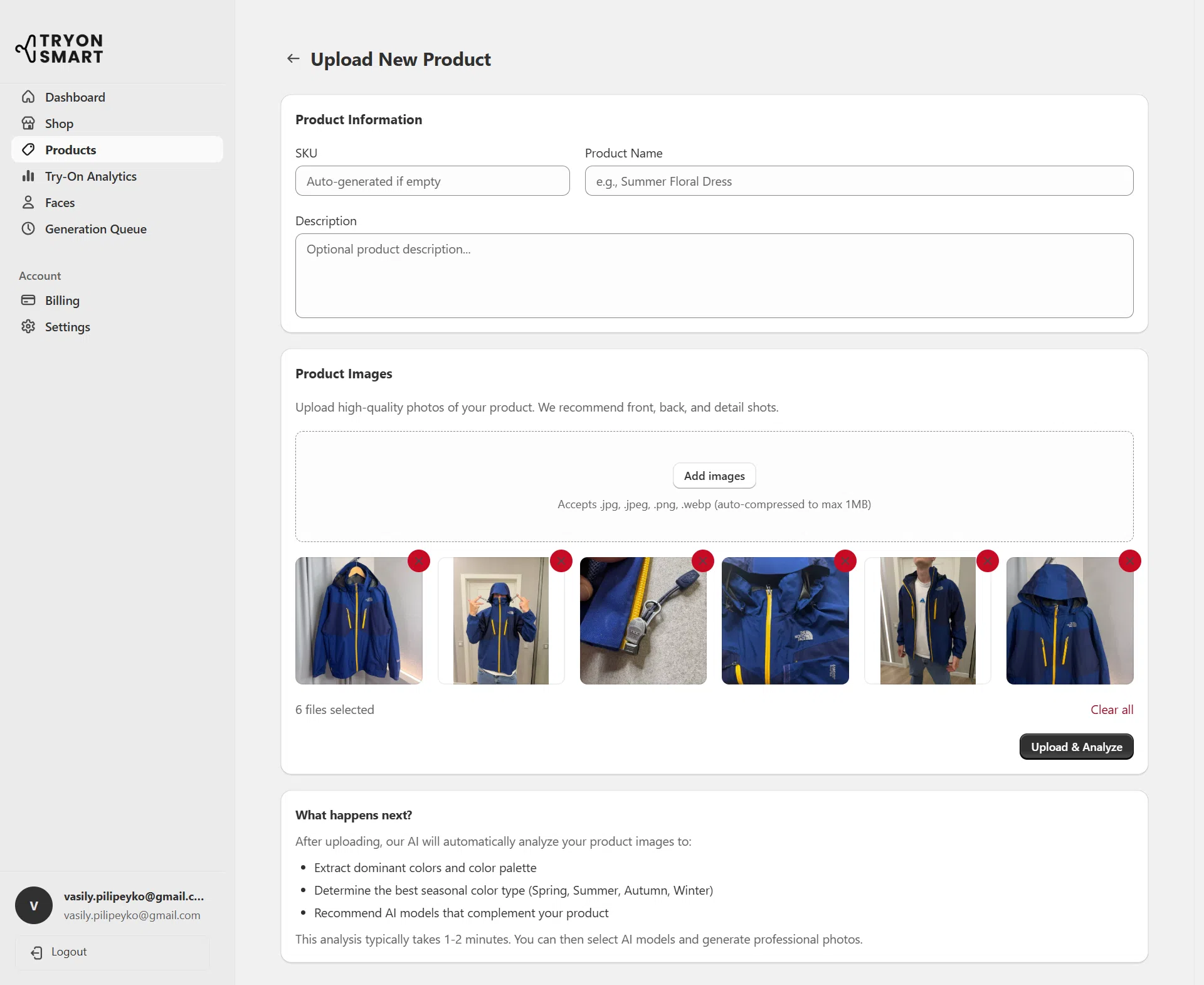
Upload your garment photo
Flat-lay on a table, hanging on a door, draped over a chair - it doesn't matter.
JPG, PNG, WebP. Even manufacturer photos from your supplier work. The AI
extracts the garment regardless of background.
Pro tip: For best results, make sure the full garment is visible
and not folded over itself. That's it. No fancy lighting required.
Upload area - drag and drop or click
2
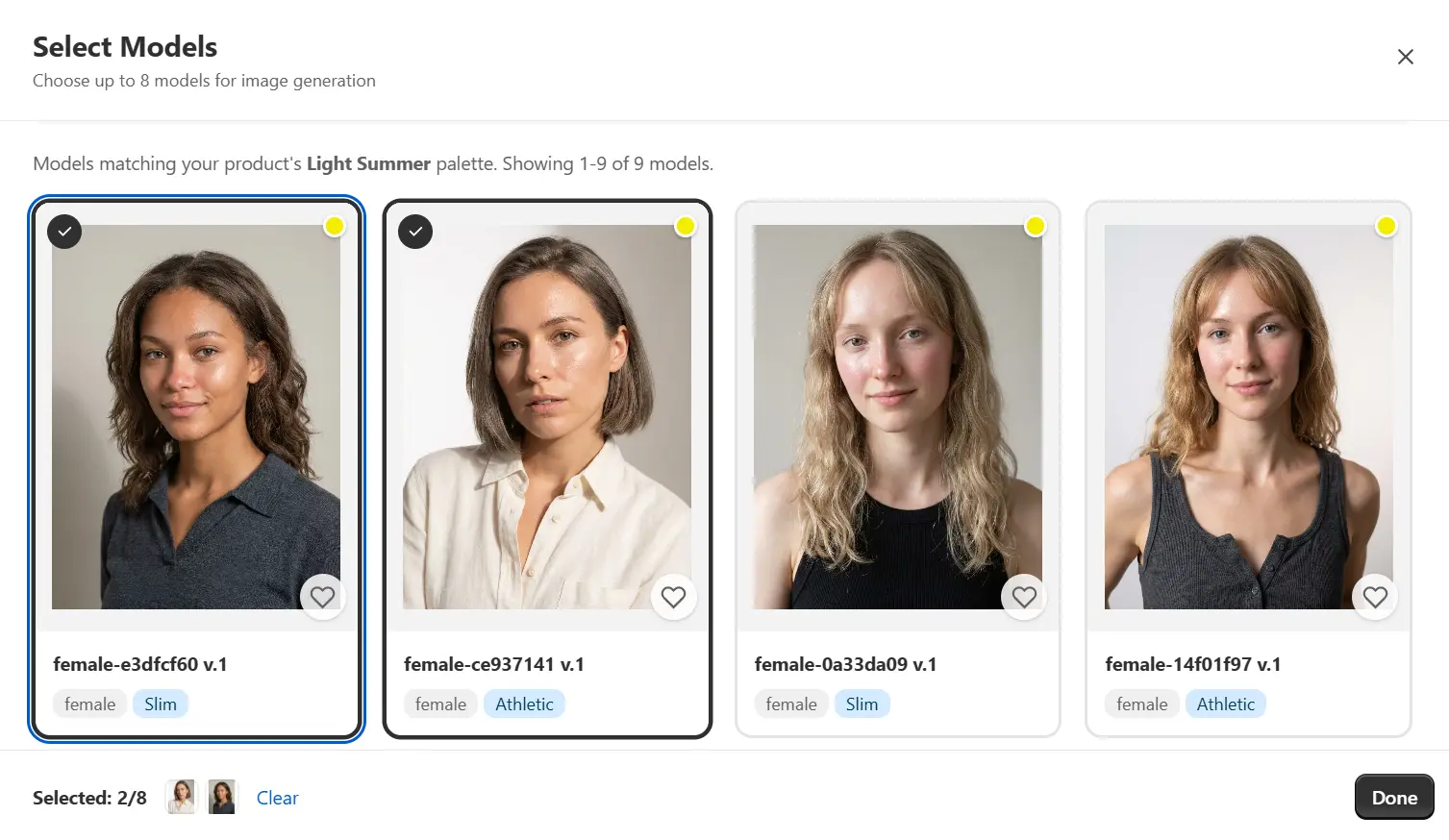
Pick a model (or let AI choose)
Browse 50+ AI models. Filter by body type - slim, athletic, mid-size, plus-size.
Filter by age range, skin tone, ethnicity. Or just describe what you want:
"Athletic build, late 20s, warm skin tone."
Want consistency across your catalog? Save your favorites and reuse them.
Want to test what converts better? Generate the same garment on 3 different models
in under 2 minutes.
50+ models - filter by body type, age, ethnicity
3
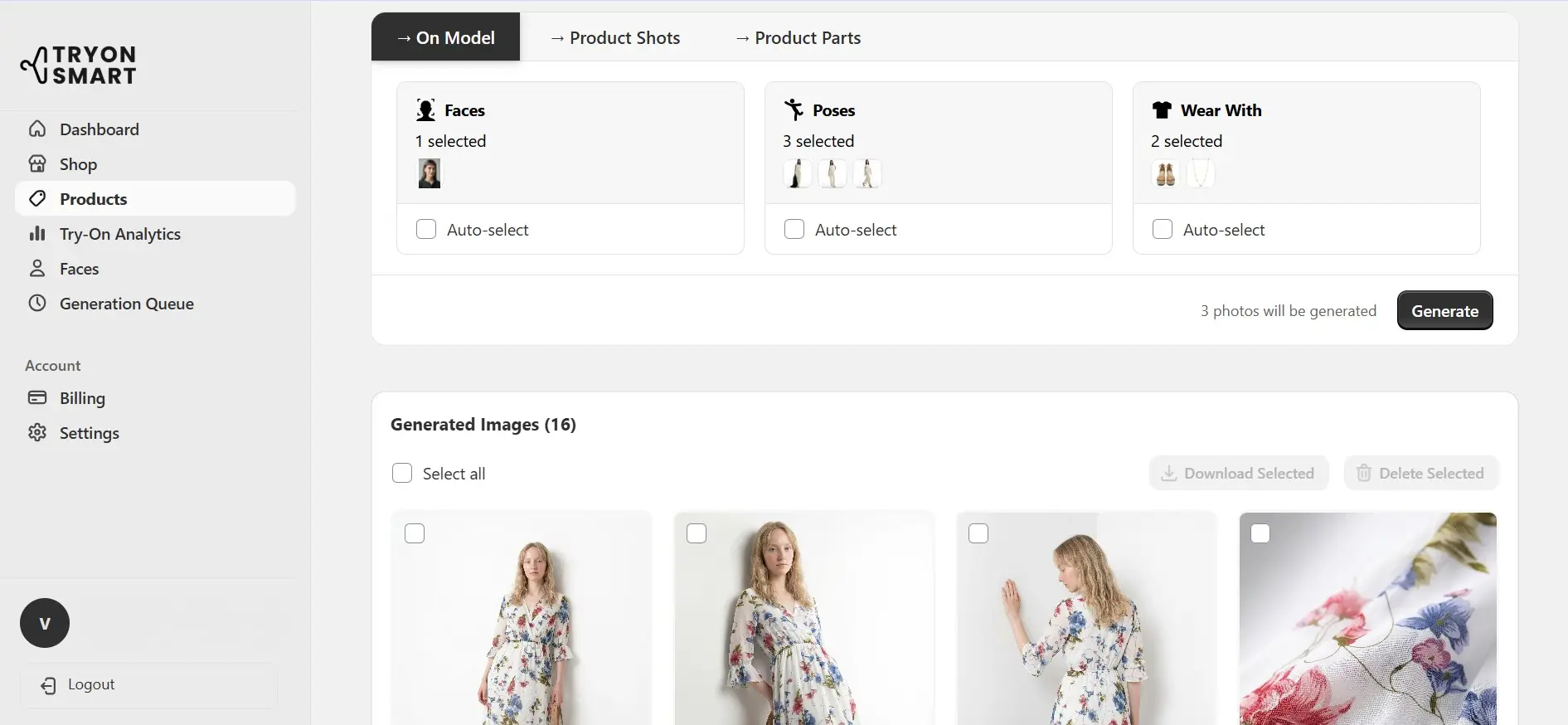
Download your product photos
30-90 seconds later, your on-model image is ready. Up to 2048x2048px resolution -
sharp enough for Amazon zoom, Shopify lightbox, or print catalogs.
Not quite right? Type what you want changed: "make the lighting warmer,"
"outdoor background," "arms at sides instead of on hips." The AI adjusts
without starting over.
Download in full resolution, or refine with text
Look closer. The fabric is real.
Most AI photo tools paste your garment onto a model like a flat sticker.
The result looks... off. The fabric doesn't move. Patterns don't wrap.
Nobody's fooled.
TryOnSmart's AI actually understands fabrics. It knows silk drapes differently
than denim. It knows a knit sweater stretches across shoulders. It knows
plaid patterns need to align at the seams. Look at the details:
Silk that flows
Notice the natural drape at the waist and how light catches the fabric
at different angles. This isn't a texture overlay - the AI simulates how
silk actually behaves on a body in motion.
Denim that holds
Denim is rigid. It creases at joints, holds its shape at the hip,
and stacks slightly above the shoe. The AI knows this. Zoom in on the
knee - those creases weren't painted on.
Patterns that align
Stripes, plaid, florals - patterns need to wrap naturally around the body
and line up at seams. This is where cheap AI tools fail immediately.
Ours doesn't.
Slow zoom into AI-generated fabric rendering. Every wrinkle, shadow, and fold
is computed from your original garment photo.
Real results from real garments
Every image below started as a flat-lay garment photo. Different fabrics.
Different body types. Different styles. All generated in under 90 seconds each.
Click any image to see it full-size.
Stand out in Etsy search - without a photography budget
Etsy's algorithm favors listings with higher click-through rates.
On-model photos get significantly more clicks than flat-lays - that's
not a guess, that's what the data says.
But most Etsy sellers are one-person operations. You can't hire a photographer
for every new piece. You probably photograph on your kitchen table.
With TryOnSmart, you upload that kitchen-table flat-lay and get back a
professional on-model shot. Same garment, completely different listing.
One seller told us their daily views went from 12 to 47 after switching
to AI model photos across their top 20 listings.
Meets Etsy's recommended 2000px image specs
Generate multiple model options - A/B test what converts best
No minimum order. 1 photo or 500.
Product pages that look like you have a studio team
Your Shopify product page is your storefront. When a flat-lay photo sits next to
a competitor's professional model shot, the flat-lay loses. Every time.
TryOnSmart gives you studio-level imagery at a fraction of the cost.
Consistent lighting, consistent quality, consistent models across your
entire catalog. Your store looks like a brand, not a side hustle.
The bulk upload feature is where it really pays off. Upload your Spring
collection as a CSV - 80 garment photos with product names. Get back 80
on-model images, organized and ready to drop into Shopify.
High-res output for Shopify's built-in zoom
Consistent style across your entire product catalog
Bulk CSV/Excel upload - process your whole collection at once
Stop sharing the same supplier photos as everyone else
The biggest problem in dropshipping isn't finding products. It's differentiating
them. You, and 200 other sellers, are all using the same manufacturer flat-lay
from the same AliExpress listing.
Upload that supplier image to TryOnSmart. Get back a unique on-model product photo
that none of your competitors have. Same $8 top, completely different perception.
Your listing looks premium. Theirs looks like a catalog rip.
Works with low-quality supplier photos - AI cleans up and enhances
Unique images your competitors can't replicate
Multiple models per product to show size inclusivity
New collection? Full lookbook by end of day.
Fashion brands need consistent, high-quality imagery across every channel - website,
Amazon, social media, wholesale catalogs. Traditional photoshoots can't keep up
with fast inventory cycles. By the time photos are edited, the season's half over.
TryOnSmart gives you photoshoot-quality images on demand. Samples arrive Monday
morning, lookbook is done by Monday afternoon. Use natural language to match your
creative direction: "warm lighting, beach setting, relaxed pose."
Custom AI models that match your brand identity
Consistent aesthetic across hundreds of SKUs
Text-based refinement - direct the AI like you'd direct a photographer
AI photography vs traditional photoshoots - honest comparison
We're not going to pretend AI replaces every type of photography.
For editorial shoots with a specific creative vision, hire a photographer.
But for the 90% of product photography that's "garment on model, clean background,
good lighting" - here's how the math works out:
When to hire a photographer instead: Brand campaign shoots, editorial spreads,
images that need a very specific location or creative concept, or when your brand identity
depends on a particular photographer's style. AI handles the volume work.
Photographers handle the art.
What sellers are seeing after switching
"I was spending $3,000 a month on product photography. Now I spend $149.
The quality is comparable - honestly, my customers can't tell the difference.
But the speed? I photograph new inventory the day it arrives. That used to take 2 weeks."
- Etsy seller, 200+ listings
"My return rate dropped 19% after switching to on-model photos.
When customers can see how clothes actually look on a body - different
body types, not just one size-2 model - they buy with more confidence."
- Shopify store owner, womenswear
"I dropship from 3 suppliers. Every competitor uses the same product photos.
TryOnSmart gave me unique model images nobody else has. My click-through rate
doubled in the first month."
- Dropshipper, 400+ products
Starts free. Seriously.
No credit card. No "free trial that charges you in 7 days." Upload 5 garments,
generate 20 AI photos, and decide if it works for your business. If it does,
paid plans start at $69/month.
Free
$0/forever
3 products
12 AI photos
Starter
$79/month
30 products
200 AI photos
48 regenerations
Most Popular
Growth
$159/month
100 products
600 AI photos
160 regenerations
That's $0.26 per image. A traditional photoshoot? $150+.
Free plan includes 5 products and 20 AI photos. No expiration.
Frequently Asked Questions
Everything you need to know about our AI virtual try-on technology
How does AI product photography work?
You upload a photo of your garment - a flat-lay, hanger shot, or even a manufacturer image. The AI analyzes the fabric type, cut, patterns, and details, then generates a realistic image of your garment on your chosen AI model. It respects how the fabric naturally drapes, folds, and moves on a human body. The whole process takes 30 to 90 seconds per image.
What types of clothing work best?
Dresses, tops, blouses, t-shirts, jackets, coats, sweaters, pants, skirts - basically anything you can photograph flat. The AI handles different fabrics including silk, cotton, denim, leather, knit, and sheer materials. For best results, use a clear photo with the garment fully visible and not folded over itself. Background doesn't matter.
Is the quality good enough for my online store?
Yes. Output resolution goes up to 2048x2048 pixels - more than enough for Etsy, Shopify, Amazon, and any other marketplace. The AI produces realistic fabric rendering, natural lighting, and proper body proportions. Many of our users report that customers can't tell the difference between AI-generated and traditional photoshoot images.
How much does this cost compared to a photographer?
Traditional product photography runs $50 to $200+ per image when you factor in the photographer, model, studio, and editing. With TryOnSmart, images start from $0.29 each on paid plans, and the free plan gives you 20 images at no cost. That's a 90%+ cost reduction with no booking fees, no minimum orders, and no wait times.
Can I use these images commercially?
All images you generate are yours to use commercially - on your online store, marketplaces, social media, advertising, and print materials. No licensing fees, no usage restrictions, no royalties.
What if the result isn't quite right?
You have several options. Regenerate for a different variation, switch to a different AI model, or use natural language refinement - type instructions like "make the lighting warmer" or "change to an outdoor background" and the AI adjusts without starting over. Paid plans include regeneration credits for this.
Can I process products in bulk?
Yes. Upload via CSV, Excel spreadsheet, or paste product URLs. This is ideal for stores with large catalogs - upload hundreds of garment images and generate on-model photos for all of them without manual work. Many sellers use this to photograph new inventory the same day it arrives.
How diverse are the AI models?
The library includes 50+ AI models across multiple body types (slim, athletic, mid-size, plus-size), skin tones, ethnicities, and age ranges (20s to 60s+). You can also create custom AI models that match your specific brand identity. Showing your products on diverse models helps customers visualize how clothes will look on them, which reduces return rates.
Do I need professional photos of my garments to start?
No. The AI works with phone photos, flat-lays on any surface, hanger shots, and even low-quality manufacturer images. You don't need professional lighting or a white background. As long as the full garment is visible and not folded over itself, the AI can work with it.




What sellers are seeing after switching